What changes
One button for the whole league. Round-up sits on the boxes, beside Edit players. It covers every box you run, and you untick any you want to leave out.
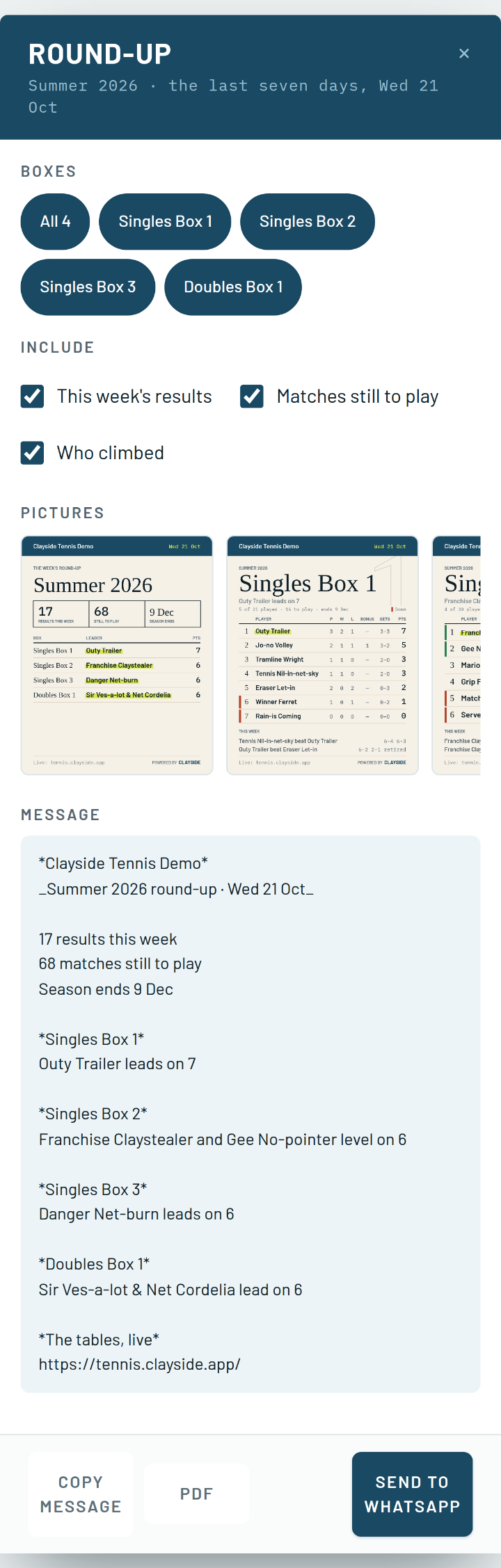
A message the group will read. The club, the season and the date. How many results came in this week and how many matches are left. Then a line for each box saying who leads, and a line for anybody who climbed. With three boxes or fewer, the week’s results are listed under each one. It ends with the link to the live tables.
A picture of every table. One card per box, with the club’s name across the top: the table with bonus sets, who goes up and who goes down, and this week’s results under it. A cover card shows every box’s leader. They land in the chat as pictures, so nobody has to open a file to see where they stand. Names are written in full wherever they fit, and a doubles pair gets both names.
Or a PDF. The same cards, a page each, to print for the clubhouse board or attach to an email.
You see it before it goes. The pictures and the message are on screen before anything is sent. On a phone, Send to WhatsApp opens the share sheet with the pictures and the message together. On a laptop, WhatsApp opens with the message written and the pictures land in your downloads, ready to drag in.
A reminder every other Sunday. At 6pm on every other Sunday of the season, whoever runs a box gets a notice that the round-up is ready, as long as the week had results. Tap it and the round-up opens. If you leave one unread, a second one never lands on top of it.
Where to find it
Boxes, on the season line beside Edit players and Settings. The owner sends it for every box and a box admin for their own. Players never see the button, and nothing goes anywhere until you press Send. The Sunday reminder is under What buzzes, as Jobs for the club.